
Native Reindex and Reset
Adds both operations to System > Tools > Index Management instead of replacing the core grid with another admin page.
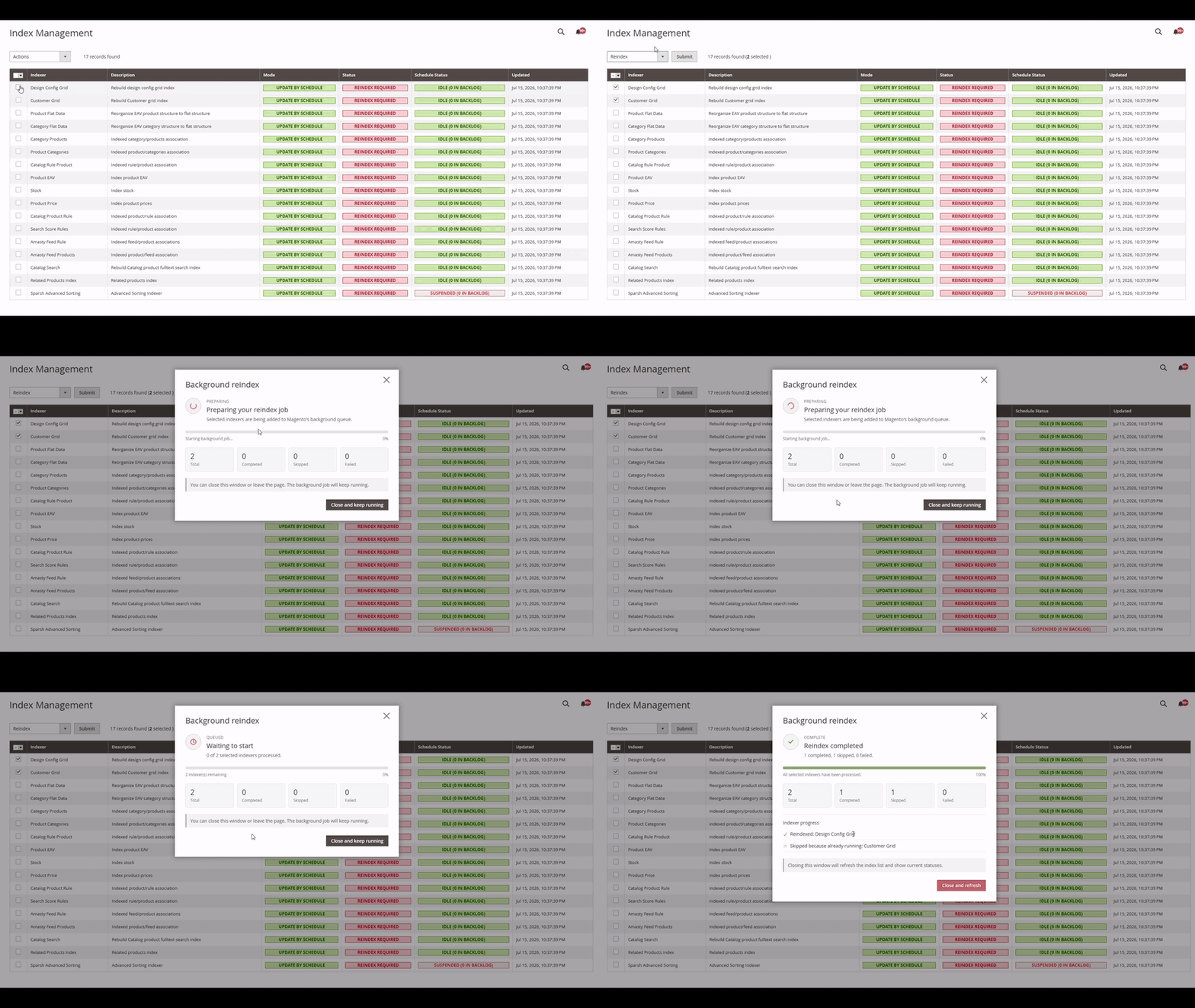
Reindex or reset selected indexers from Magento's native grid, follow live progress, and get an early warning when the background worker is unavailable.
See it in action
The animation demonstrates the Reindex flow. Reset uses the same queue-backed progress workflow in version 1.1.0.
What it handles
The module adds Reindex and Reset to Magento's native grid and uses Magento services for permissions, locking, queueing, health checks, and progress.
Adds both operations to System > Tools > Index Management instead of replacing the core grid with another admin page.
Warns administrators when no working consumer path is detected, before queued jobs appear to stall silently.
Reuses progress from an active operation when the same indexer is already pending or running instead of queuing it twice.
The popup combines new and active operations and shows running, completed, skipped, failed, and remaining indexers.
Once work is queued, closing the popup or leaving Index Management does not cancel the scheduled job.
Uses Message Queue, Bulk Operations, ACL, LockManager, cron history, indexer APIs, and the native admin UI.
How it works
The admin flow stays short. Magento handles ownership, persistence, locking, and queue execution underneath.
Open Index Management and choose one or more indexers, or use Magento's Select All control.
Choose Reindex or Reset. The extension validates permissions, checks worker health, and reuses active work before scheduling anything new.
Track progress in the popup, then close it or leave the page while the configured consumer continues processing.
Compatibility and installation
Supports Magento Open Source and Adobe Commerce. The PHP versions below follow the module's documented release matrix.
| Magento | Supported PHP |
|---|---|
| 2.4.4 | 8.1 |
| 2.4.5 | 8.1 |
| 2.4.6 | 8.1, 8.2 |
| 2.4.7 | 8.2, 8.3 |
| 2.4.8 | 8.3, 8.4 |
| 2.4.9 | 8.4, 8.5 |
Composer
composer require haroone/module-admin-reindex:^1.0Magento setup
composer require haroone/module-admin-reindex:^1.0
php bin/magento module:enable Haroone_AdminReindex
php bin/magento setup:upgrade
php bin/magento setup:di:compile
php bin/magento cache:clean
In production mode, include php bin/magento setup:static-content:deploy -f in the normal deployment flow for the small admin JavaScript and CSS assets.
Magento registers the module's MySQL queue destination during recurring setup. Without it, jobs can appear scheduled but never start.
Queue requirement
The extension checks for a working consumer path before scheduling and shows a warning when none is detected. It never starts operating-system processes from an admin request.
php bin/magento queue:consumers:start haroone.adminreindex.indexerPermissions and security
The module uses Magento's own permissions, form validation, bulk ownership, and output escaping rather than creating a parallel security model.
Users without the Index Management child permission cannot schedule work or request progress.
Progress is restricted to the admin user who created the bulk operation.
Bulk Operations and Message Queue keep the scheduled job in Magento.
Admin output is escaped, while complete exceptions remain in Magento logs.
FAQ
For implementation details, version changes, and troubleshooting, use the module README and GitHub Issues.
No. It does not change indexer modes, cache state, PHP limits, or store configuration.
No. The admin request schedules background work. Closing the popup or leaving the page does not stop the queued job.
Reset uses Magento's native invalidate operation, matching bin/magento indexer:reset, and schedules it through the same background workflow as Reindex.
Index Management shows a warning before scheduling. The job can still be queued, but it will not run until Magento's consumer path starts processing messages.
Not while an Admin Reindex bulk operation for that indexer is pending or running. The extension reuses the existing operation and shows its progress.
Later indexers continue. The popup shows a safe summary while the complete exception is written to Magento logs with the indexer ID.
Magento's consumers cron group must run so the message-queue consumer can process scheduled reindex jobs.
No. The module adds a dedicated Reindex Data ACL resource beneath Index Management, and progress is restricted to the admin user who created the bulk job.
Release notes
Review new features, operational changes, and deployment guidance before updating the module.
Support and engineering
Use GitHub Issues for reproducible product bugs and feature requests. For store-specific module, migration, performance, or checkout work, send the store context directly.