A safer Magento 2 workflow for creating in-store orders

A retail team needed a faster, clearer way to record counter sales in Magento without asking staff to navigate the full general-purpose Admin order process. The solution is a focused four-step Admin workflow that keeps Magento responsible for products, customers, tax, orders, invoices, shipment, email, and lifecycle rules.
The interface reduces the number of decisions presented at once, while server-side validation prevents the streamlined UI from bypassing Magento's core business rules.
- Delivery
- Custom Magento 2 Admin module
- Workflow
- Four guided stages
- Records
- Native Magento sales lifecycle
- Verification
- Non-production environment
Technical stack
- Magento 2 Admin
- PHP and JavaScript
- Native orders and invoices
- Tax, shipment, email, and ACL
The operational problem
Magento's native Admin order tooling is powerful because it supports many catalogue, customer, payment, shipping, and tax scenarios. That breadth can also make it unnecessarily demanding for a member of shop staff who needs to record a straightforward in-store transaction.
The workflow needed to make common counter-sale actions easier without creating a second, disconnected commerce system. Every transaction still needed to remain a genuine Magento order that could be viewed, invoiced, shipped, emailed, reported on, and managed through Magento's normal lifecycle.
- Give staff a focused and predictable order-entry journey.
- Preserve Magento as the source of truth for commercial records and state transitions.
Why native Magento ownership mattered
A shortcut that writes directly to sales tables or stores orders in a custom database would create long-term problems. Native reporting, customer history, tax allocation, credit memos, inventory deduction, invoice emails, extensions, and future Magento upgrades all expect Magento-owned records and lifecycle events.
The module uses a purpose-built Admin interface, but the submitted data is validated and passed through Magento services. This keeps the experience specialized while preserving compatibility with the platform around it.
- Existing products are reloaded and revalidated before submission.
- Customer matching respects Magento website scope.
- Tax and totals remain compatible with invoices and credit memos.
- Order statuses are checked against the order's actual final state.
- Shipment and inventory behavior remain inside Magento's normal flow.
- In-store records can be filtered without replacing native sales records.
The four-step workflow
Products, customer information, payment and VAT, then review and submission form one predictable journey. A persistent summary keeps the developing order visible, while the server remains responsible for identity, permissions, configuration, and valid Magento actions.
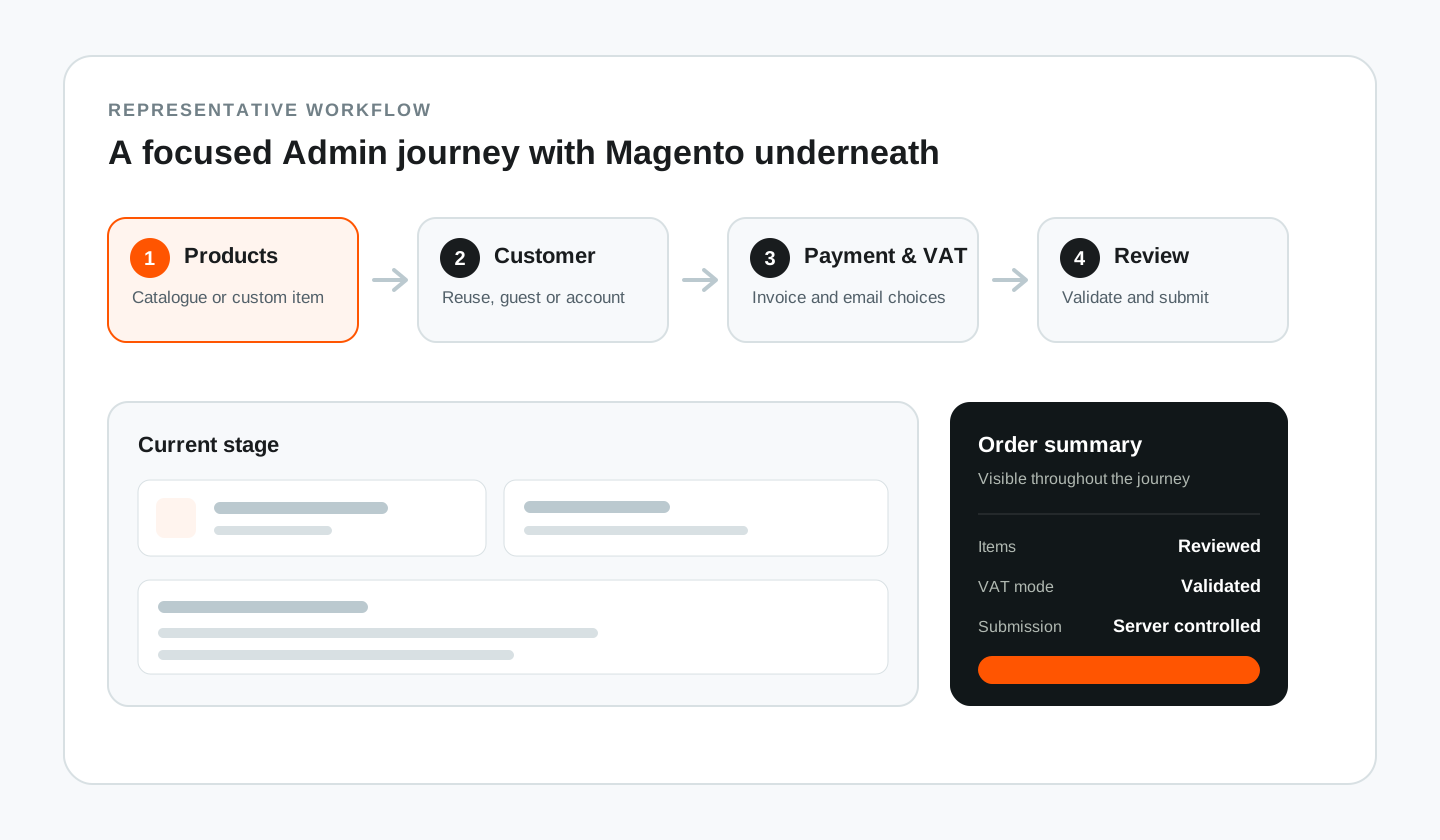
1. Products
The first step lets staff choose between two clearly separated product sources.
Add from catalogue searches enabled and saleable Magento products. The final submission does not trust browser data. Magento reloads each selected product and validates its identity, supported product type, enabled status, and saleability before the order is created. Staff can review quantity, unit price, and tax class. Any permitted price or tax-class adjustment belongs to the current order line only. It does not rewrite the catalogue product.
Add a custom item supports a genuine one-off product that should appear on the order without becoming a visible catalogue product. The module uses a hidden internal product as the Magento-compatible carrier and gives each custom line an IS-XXXXXXXX reference. This avoids polluting catalogue search while still producing a valid order item. A persistent order summary shows item count and subtotal, and empty-state handling avoids irrelevant controls.
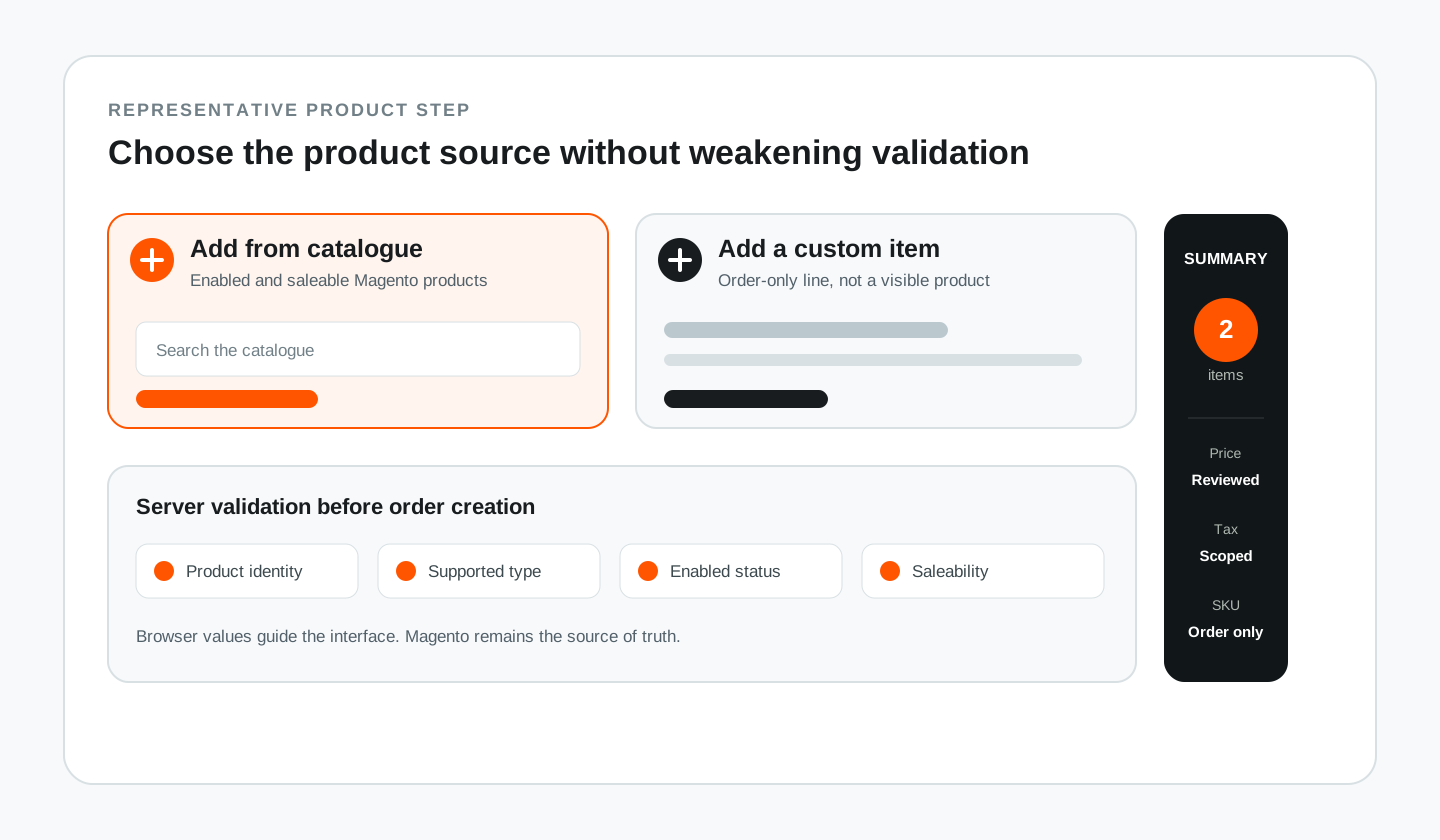
2. Customer information
The second step brings customer, billing, and contact information into one structured view.
The module can reuse an existing customer within the correct Magento website scope. For a new shopper, the administrator can create a customer account without managing a password in the order form, or continue with a guest order when an account is unnecessary. Required customer and address fields are configurable through Magento Admin. Posted values are validated again on the server, so a modified browser request cannot bypass the configured requirements.
If email is optional and left blank, the order becomes an anonymous guest order using an internal non-deliverable address. Account creation and transactional emails are disabled for that anonymous flow. If country is optional and omitted, the module uses Magento's configured default country. These fallbacks let a counter sale proceed without inventing customer data or weakening normal validation.
3. Payment, VAT, invoices, and emails
The third step records how payment was received and controls optional post-order actions.
The administrator can record Cash, Card, Bank Transfer, or Other. A payment reference is required for non-cash methods, but the interface explicitly avoids collecting full card numbers or bank-account details. The resulting information is available in Magento's native payment information and relevant Admin grids.
VAT can follow Magento tax classes on each line or use a controlled manual percentage or exact-amount mode when required. Even in manual mode, the result is allocated through Magento-compatible totals so the order, invoice, PDF, and any later credit memo remain internally consistent. Depending on configuration and the administrator's selections, the workflow can request the order-confirmation email, create a paid offline invoice immediately, and request Magento's native invoice email. All options are validated on the server.
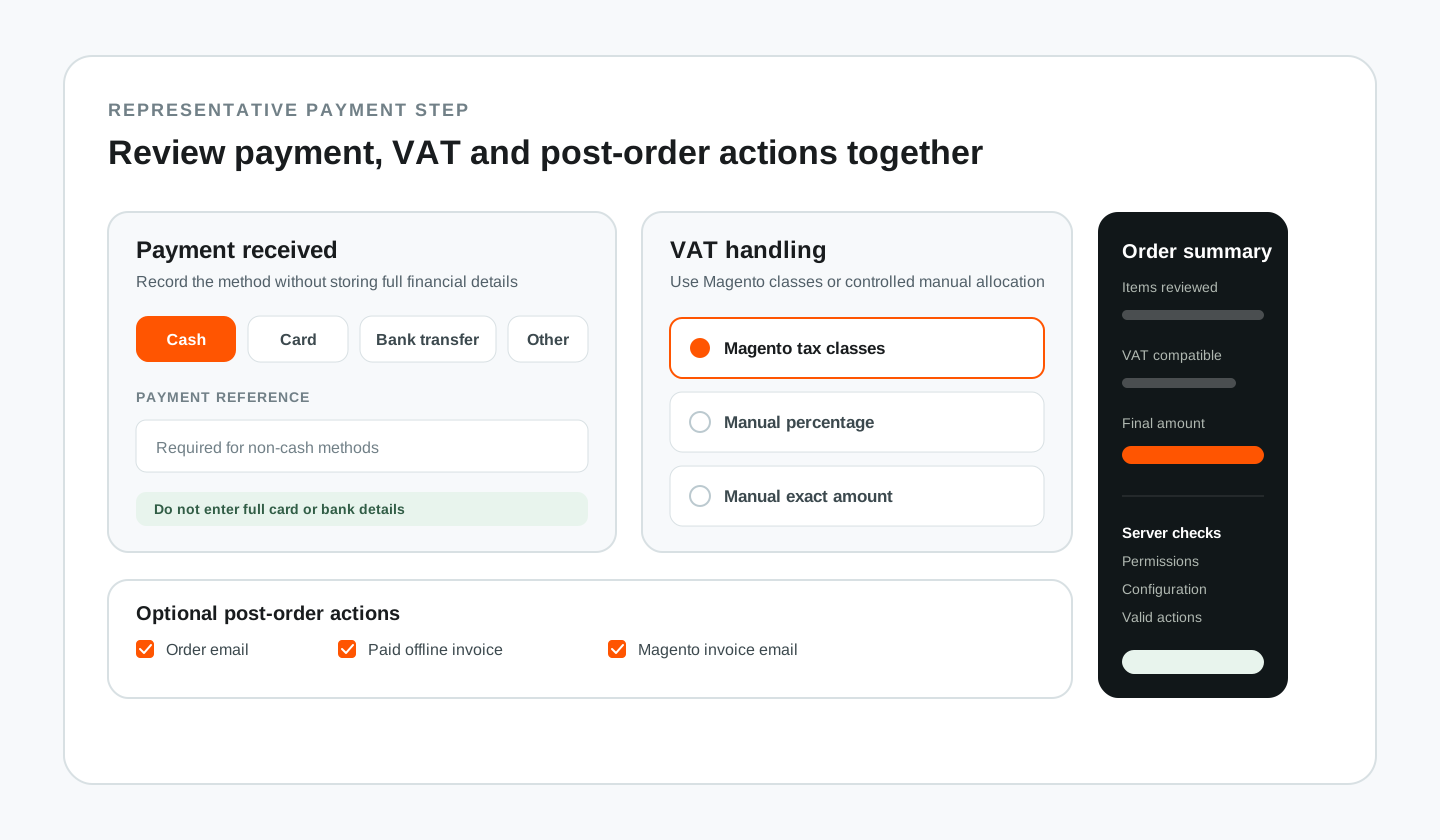
4. Review and submit
The final step presents the information needed for a last operational check: products, quantities, customer, addresses, totals, VAT mode, payment details, invoice and email choices, and any internal order comment.
The internal comment is stored in Magento's native order Comments History. It is not displayed to the customer and does not trigger a customer notification. On submission, the module creates the Magento order and then performs the selected post-processing actions. Physical items can be shipped through Magento's normal shipment and inventory flow. Virtual items do not force an invalid shipment operation. The interface protects against duplicate clicks, but the server remains the final authority for all values and permissions.
Technical architecture and data integrity
The implementation is configuration-driven and Magento-native. The module provides dedicated Admin navigation for creating orders, viewing in-store orders, viewing in-store invoices, and managing configuration. ACL resources control access. Store-scoped configuration covers required customer fields, VAT behavior, invoicing and email defaults, and a safe default order-status preference.
In-store orders remain standard Magento orders with an identifying flag and additional payment context. Dedicated grids filter records created through this workflow, while orders and invoices remain in Magento's native sales data. Where staff enter a tax-inclusive final total, the module translates the difference into Magento's discount and tax pipeline rather than overwriting grand totals after calculation. Selected catalogue products are reloaded during submission, and custom items remain order-specific instead of creating a visible product for every sale.
- Admin ACL and store-scoped configuration protect access and behavior.
- Native quote, order, invoice, shipment, tax, and email services own the lifecycle.
- Dedicated grids filter in-store records without duplicating sales data.
- Magento-compatible totals preserve invoice and refund coherence.
- Server-side product validation rejects unavailable or tampered selections.
Lifecycle safety and recovery
Order creation is only the first part of a Magento transaction. Invoicing and shipping can change the order state after placement, so status handling must take the final lifecycle state into account.
The configured default status is applied only when Magento has assigned that status to the order's actual final state. If the configured status was deleted, reassigned, or is incompatible, the module keeps Magento's automatic status. The workflow does not offer an unrestricted per-order status selector because invoicing, shippable items, and automatic shipment can change what is valid after submission.
If the order is placed successfully but a later invoice, shipment, email, or status action fails, the module preserves the order, records the failure context, and directs the administrator to a recovery message instead of attempting an unsafe partial rollback. Automatic shipment is safe for the default or single-source case. A multi-source environment needs an explicit source-selection and recovery strategy before automatic shipment can be treated as universally safe.
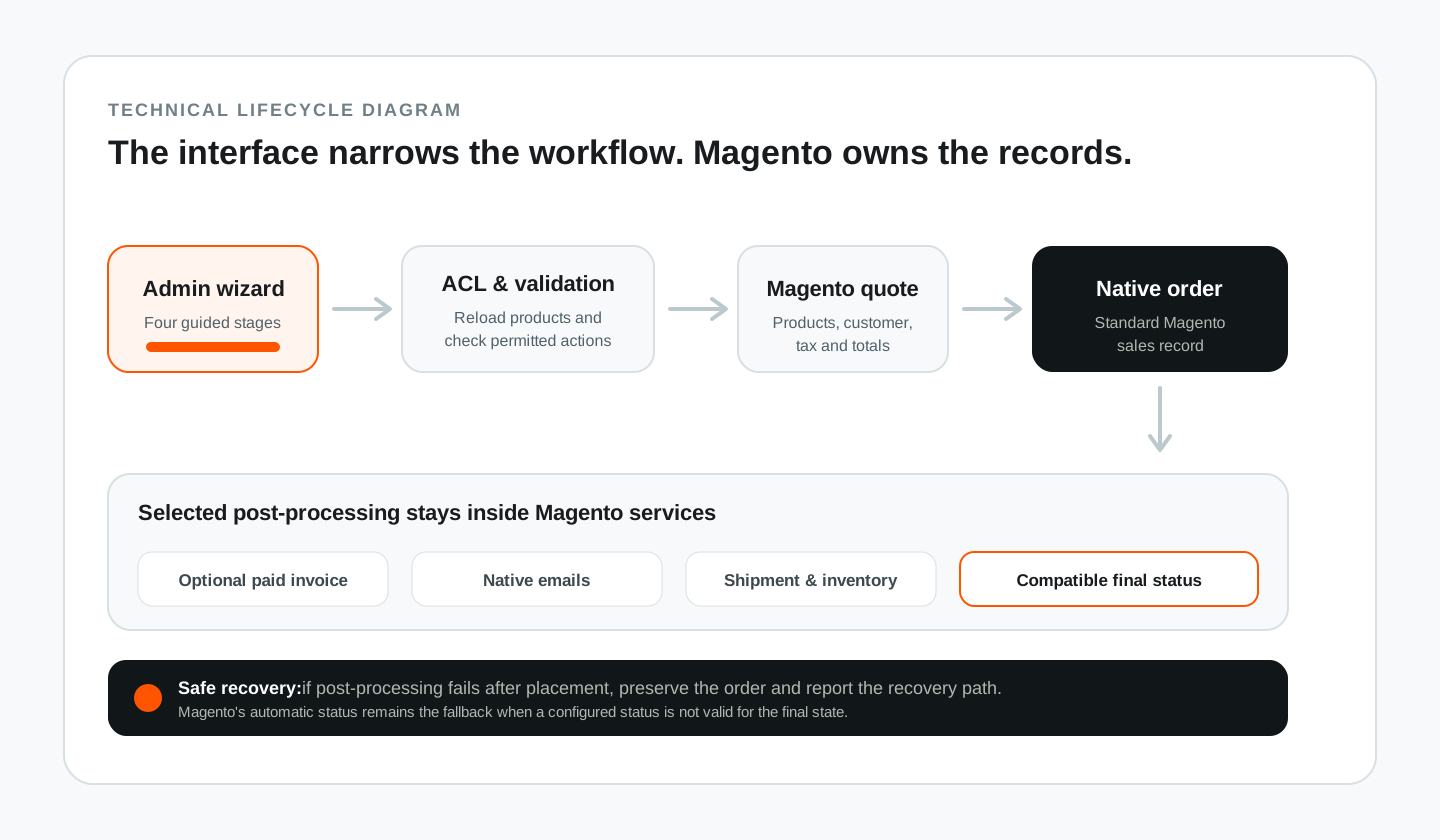
Verification and release status
The module has been structurally and functionally verified in a local Magento environment without creating a new test order during the latest release checks. Verification has included focused PHPUnit coverage, module and route checks, Admin UI component checks, source-to-runtime parity, cache and generated-code handling, and read-only inspection of existing records.
The exact active release number, artifact checksum, rollback path, and deployment date should be copied from an approved release record at publication time. A development version is not hardcoded into this public article because it would need maintenance after every module release.
Implementation status: the extension and workflow have been built and verified in a non-production Magento environment. Production activation and post-launch outcomes are not claimed here unless a separate approved release record is supplied.
Validated implementation outcome
The validated result is a focused Admin workflow that reduces the complexity presented to staff while retaining Magento's native ownership of the transaction.
The implementation demonstrates that a specialist in-store experience does not need to bypass Magento's architecture. The interface can be simplified while product validation, customer scope, tax allocation, totals, invoices, shipment, inventory, email, ACL, status compatibility, and failure recovery remain governed by server-side platform rules.
Commercial outcomes should be added only after production activation has been confirmed and a measurement method agreed. Any future order-entry time, correction rate, training time, invoice recovery, or processed-order figure must include its date range, sample size, and source.
Magento workflow engineering
Need a Magento workflow adapted to the way your team works?
Haroone designs Magento 2 Admin tools that simplify operational work without disconnecting orders, customers, tax, inventory, and invoices from the platform that owns them.

 HaroonFounder & Magento Engineer
8 min read